Ferrous Menu
Gitlab: https://gitlab.com/xicalango/fmenu
Crate: https://crates.io/crates/ferrous-menu
Ferrous Menu (fmenu)
Ferrous Menu (or fmenu in short) is a minmal GUI for choice selection, similar to dmenu or rofi, written in rust using FLTK.
Usage
Basic Usage
fmenu -o option1 -o option2 -o option3This will show a window for selecting between the three options option1, option2, option3:
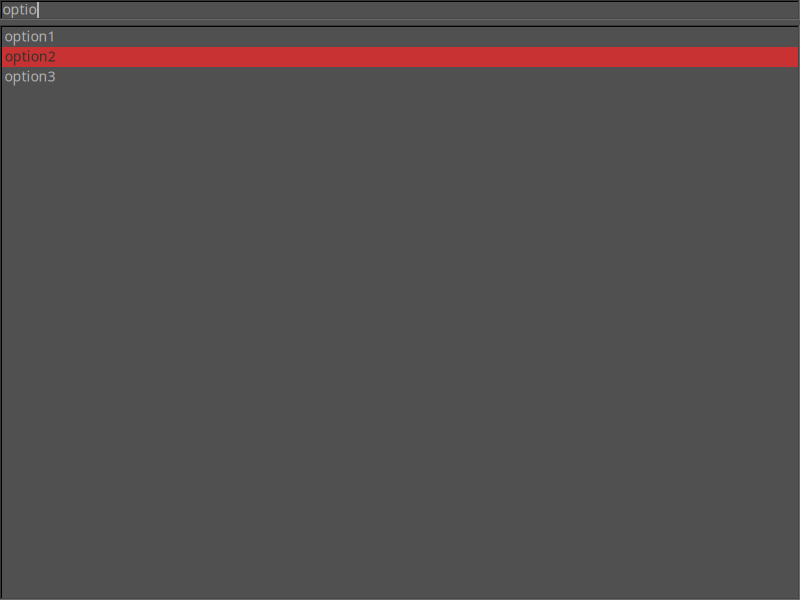
The selected option will be printed to stdout once the user presses Enter.
If no selection was made (for example because the user pressed ESC to close the window), the application will exit with error code 75.
Reading options from stdin
Instead of giving the options via command-line flags you can also provide them via stdin:
ls | fmenuThis will show all files in the current directory for selection.
Filtering
You can filter the options by typing in a string that should appear anywhere in the desired option. If the string appears anywhere in the list of options it will be shown.
Configuration
Fmenu can be configured through a configuration file. The default location for the configuration file is $XDG_CONFIG_DIR/fmenu.rc and can be overwritten with the -c <configfile> argument.
Here's an example configuration file showing all options:
[window]
width: 800            # width of the window [default: 800]
height: 600           # height of the window [default: 600]
positioning: center   # positioning strategy of the window [default: center]

[theme]
theme = "black"       # FLTK theme [optional]
Themes
Fmenu uses the fltk-theme to apply themes. Hence the list of available themes is:
BlackDarkGreyShakeTan
Motivation
I think I started this project because I wanted to run passmenu on a MacBook, but couldn't get dmenu (or a replacement) to work like I wanted it to work.
From a previous project I knew that FLTK applications compile and run somewhat easily on MacOS, so and I was already somewhat familiar how to program FLTK apps in rust, so I wrote this small replacement.
As a result, fmenu has been tested thoroughly as a replacement for dmenu in passmenu.
Implementation details
Since the project is so small there isn't too much to say about it's implementation.
The only thing to highlight is probably how managing the GUI state is done via message passing (which is also a pretty standard way of handling GUIs). The nice thing about this is that the functionality is a bit more decoupled from the GUI.
There are 5 defined messages:
enum UiMessage {
    MoveDown,
    MoveUp,
    Select,
    SelectValue(String),
    Filter(String),
}
Two of the options (MoveDown, MoveUp) are for moving the selection, Select is for confirming the current selection, SelectValue is for the case a user clicked on an option, and Filter is for filtering the selections.
Each action in the UI, e.g. pressing the up/down arrow key, pressing enter, typing a filter, or clicking on an entry will emit one of these (domain specific) messages, which then will be handled by a simple main loop. The loop with listen for incoming UI messages and update the state based on these messages.
This makes the logic very easy to understand and predictable.